

思科交换机配置命令大全
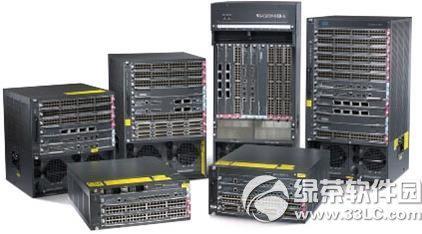
思科交换机配置命令大全来咯~飞翔铭月带来了思科交换机配置手册,如果你还不知道思科交换机能够使用哪些配置命令的话,那么就可以对照下文来学习相关的命令哦~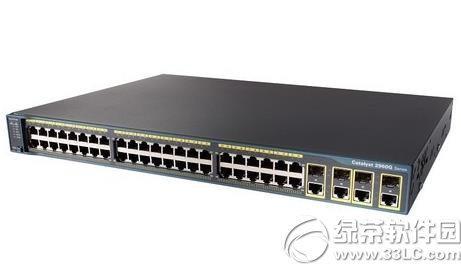
交换机基本状态:
hostname>/用户模式hostname#/特权模式
hostname(config)#/全局配置模式 hostname(config-if)#/接口状态交换机口令设置:
switch>enable/进入特权模式switch#configterminal/进入全局配置模式
switch(config)#hostname/设置交换机的主机名
switch(config)#enablesecretxxx/设置特权加密口令 switch(config)#enablepasswordxxa/设置特权非密口令 switch(config)#lineconsole0/进入控制台口 switch(config-line)#linevty04/进入虚拟终端 switch(config-line)#login/允许登录 switch(config-line)#passwordxx/设置登录口令xxswitch#exit/返回命令
交换机VLAN设置:
switch#vlandatabase/进入VLAN设置 switch(vlan)#vlan2/建VLAN 2switch(vlan)#novlan2/删vlan2switch(config)#intf0/1/进入端口1
switch(config-if)#switchportaccessvlan2/当前端口加入 vlan2switch(config-if)#switchportmodetrunk/设置为干线 switch(config-if)#switchporttrunkallowedvlan1,2/设置允许的 vlanswitch(config-if)#switchporttrunkencapdot1q/设置vlan中继switch(config)#vtpdomain/设置发vtp域名
switch(config)#vtppassword/设置发vtp密码
switch(config)#vtpmodeserver/设置发vtp模式
switch(config)#vtpmodeclient/设置发vtp模式
交换机设置IP地址:
switch(config)#interfacevlan1;进入vlan1
switch(config-if)#ipaddress;设置IP地址
switch(config)#ipdefault-gateway;设置默认网关
switch#dirflash:;查看闪存
交换机显示命令:
switch#write/保存配置信息
switch#showvtp/查看vtp配置信息
switch#showrun/查看当前配置信息
switch#showvlan/查看vlan配置信息
switch#showinterface/查看端口信息
switch#showintf0/0/查看指定端口信息
补充:3层交换机多出的就是路由能力,体现在vlan的互相通信功能和端口的路由能力
介绍:
开启路由功能:iprouting进入vlan配置网段网关与路由配置接口相同
interfacevlan1ip192.168.1.1255.255.255.0
路由配置与路由器配置相同只是把接口换为VLAN+VLAN号,开启接口路由功能,进入接口配置:noswichport
思科交换机的配置保存命令
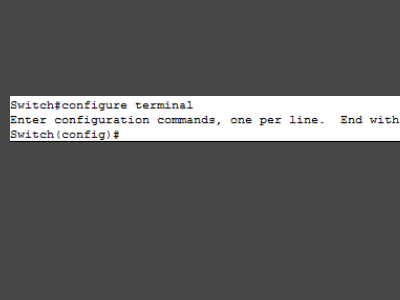
1、首先打开思科交换CLI,从特权模式进入全局配置模式,如下图所示。
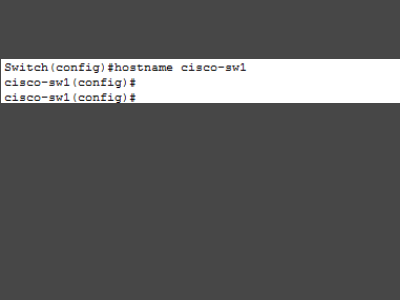
2、在特权模式下可以对交换机进行命名,这样在配置多台交换机时,避免将配置写错交换机。
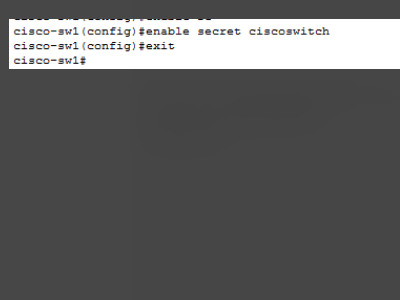
3、给交换机配置使能密码,进入特权模式时需要输入密码才能进入,避免设备可以被其他人员使用。
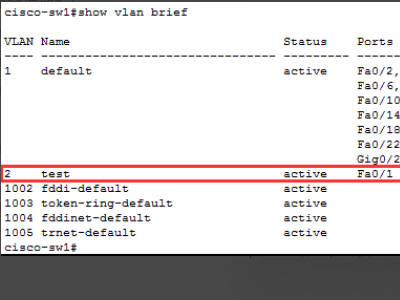
4、交换机配置VLAN,并给将端口加入到该VLAN。
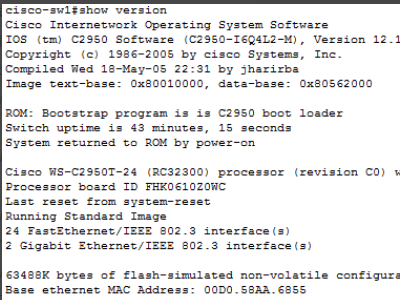
5、最后使用show:查看命令,交换机的所有配置和其它相关信息都需要通过show命令查看。
分享相关内容的知识扩展:
一台思科交换机创建两个vlan怎么分别划分两个vlan命令怎么写
CISCO的是1.全局配置模式下,输入VLAN ID,进入VLAN配置模式:Switch(config)#vlan {vlan-id}
2.为VLAN设置名字.可选:
Switch(config-vlan)#name {vlan-name}
3.创建了以太网VLAN之后,接下来把交换机端口分配到特定的VLAN里.假如你把端口分配进了不存在的VLAN里,那么新的VLAN将自动被创建.进入接口配置模式:
Switch(config)#interface {interface}
4.定义VLAN端口的成员关系,把它定义为层2接入端口:
Switch(config-if)#switchport mode access
5.把端口分配进特定的VLAN里:
Switch(config-if)#switchport access vlan {vlan-id}
6.配置中继端口,定义中继模式:
Switch(config-if)#switchport trunk encapsulation {isl|dot1q|negotiate}
7.定义端口为层2的中继端口:
Switch(config-if)#switchport mode {dynamic auto|dynamic desirable|trunk}
H3C的Vlan配置是:1.先配置Vlan的端口类型trunk/HYbride
2.将端口指定到特定的VLAN.
3.配置端口的缺省VLAN.
具体的实施命令是:[SW] Vlan enable
[SW] Vlan Vlan-id
[SW]port interface
就OK了
我有一台思科Catalyst 2900 二层交换机,一台TPLINK的路由器,咋样配置才能让思科交换机上外网?
继续详细的交换机配置命令TPLINK根据你运营商的情况配置WAN连接,如PPPoE或路由,并设置内网端口地址或直接使用默认值,如果需要为内网主机分配地址,还要配置DHCP。
C29XX默认情况不配置也可以使用,为了安全可以配置管理员口令:
host C2900 -配主机名
enable sec xxxxxx -配特权口令
为网管方便,可以配VTY:
int vlan 1
no shut
ip add 192.168.1.254 -配管理地址
line vty 0 15
login
password xxxxxx -配VTY口令
为提高 *** 连接协商速度,可以在下行口开启port-fast(不用等30s):
int ran fa0/1-23
spann port-fast
思科交换机里面aaa里面能配置什么?和华为一样吗?怎么设置?
不一样。华为的一层一层套模板,思科的简单一点,以tacacs+为例:\x0d\x0aaaa new-model //启用aaa\x0d\x0aaaa authentication login TEST group tacacs+ line //配置登录认证\x0d\x0aaaa authorization exec TEST group tacacs+ none //配置认证exec\x0d\x0aaaa authorization commands 1 TEST group tacacs+ none //配置授权命令为1级\x0d\x0aaaa authorization commands 15 TEST group tacacs+ none //配置授权命令为15级 \x0d\x0aaaa accounting exec TELNET start-stop group tacacs+ //配置授权exec\x0d\x0aaaa accounting commands 1 TELNET start-stop group tacacs+ //配置命令审计为1级\x0d\x0aaaa accounting commands 15 TELNET start-stop group tacacs+ //配置命令审计为15级\x0d\x0aaaa accounting network TELNET start-stop group tacacs+ //审计 *** \x0d\x0aaaa accounting connection TELNET start-stop group tacacs+ //审计连接\x0d\x0a \x0d\x0atacacs-server host 1.1.1.1 //指向aaa服务器\x0d\x0atacacs-server key cisco //配置共享密钥\x0d\x0a \x0d\x0aline vty 0 4\x0d\x0a authorization commands 1 TEST\x0d\x0a authorization commands 15 TEST\x0d\x0a authorization exec TEST\x0d\x0a accounting connection TEST\x0d\x0a accounting commands 1 TEST\x0d\x0a accounting commands 15 TEST\x0d\x0a accounting exec TEST\x0d\x0a login authentication TEST\x0d\x0a//在远程line下调用AAA组,注意前面和后面的TEST都是名称\x0d\x0a \x0d\x0aOK 了,telnet测试就可以了。\x0d\x0aAAA服务器上的配置就不多说了,百度一下ACS配置,很多。